
Features

One console for IT,
service and people.

Assets, AMC contracts, the helpdesk, field service, attendance and monitoring share one register of devices and people, so an alert can open a ticket and a ticket knows its equipment.

  • Free trial on every plan, no card needed

The core modules

Also in the platform

In detail

Every capability, module by module

What each module does, one line at a time. Every line is something you can check: open a module for how each part works.

IT asset management

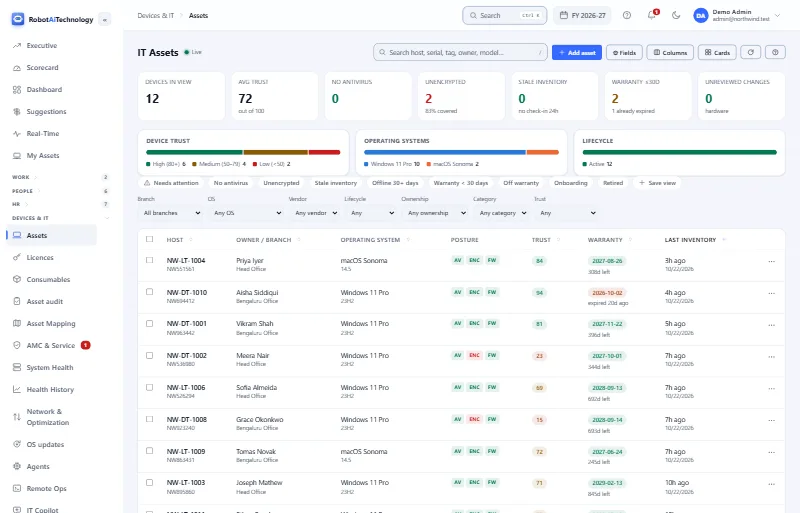
One register for every device: owners, warranty, licences, security posture and full history.

  • Free
  • Starter
  • Growth
  • Enterprise
  • Inventory that builds itselfEach computer creates its own asset record when its agent enrols. Monitors, printers, phones and furniture are added by hand.
  • Owners, assigned and mappedAssign assets one at a time or in bulk. With auto-mapping on, the Asset Map suggests each owner from who signs in on the machine.
  • The whole history of every assetAssignments, transfers, returns, upgrades, repairs, renewals and disposal on one timeline, each stamped with who and when.
  • Warranty remindersWarranty dates on every asset, shown to its owner under My Assets, with a reminder before cover runs out.
  • Owned, rented or leasedOwned, rented, leased, contracted, customer-owned or vendor-managed, with the party and end date; rentals and leases remind you as they end.
  • Software licencesLicences with seat counts and renewal dates, assigned to people or devices, with over-allocation and upcoming renewals flagged.
  • Security posture per deviceAntivirus, disk encryption and firewall for each device, straight from the agent, with a trust score from 0 to 100 so risky ones stand out.
  • Health and remaining lifeA rules-based health score, and a straight-line estimate of remaining service life and book value from the asset's own history.
  • QR labels for stock-takesPrint a QR label for any asset; scanning it opens that asset's record, for stock-takes and handovers.

Labels, audits and buying

  • A guided way to add assetsAdd asset walks through details, purchase, owner, place, warranty and software, warns about a serial already on record, and keeps an unfinished one if you close it.
  • Purchase requests, approvedRequests need a second approver, and finance above an amount you set. Budgets per cost centre show spend, and receiving creates the asset records.
  • Label designs, any printerDesign labels with the tag, a QR code or barcode and your logo. Print sheets, single labels or straight to a Zebra printer, and see what still needs one.
  • Smart labels for lost assetsAn opt-in QR with a random code: a finder sees only your company and the tag and can message you. Every scan is logged, and a code can be switched off.
  • Audits with a phoneCount assets by scanning their labels, then reconcile what is missing or not in the register. Blind counts, recounts, cycle counts and room walks are optional.
  • Audit readiness at a glanceEvery asset from registered to tagged, labelled and verified, a readiness score out of 100, and rules that queue labels and chase what is stuck.
  • Handovers people sign forEach holder acknowledges receipt in My Assets and can sign on screen. It stays in the chain of custody with the policy version they accepted.
  • Consumables and spare stockToner, cables and spares with quantities and minimum levels. Every receive, issue or adjustment is recorded, and stock never goes below zero.
  • A bin before anything is goneDeleted assets wait 30 days in a bin, where they can be restored with their history. Only an administrator can empty it sooner.

How IT asset management works

AMC management

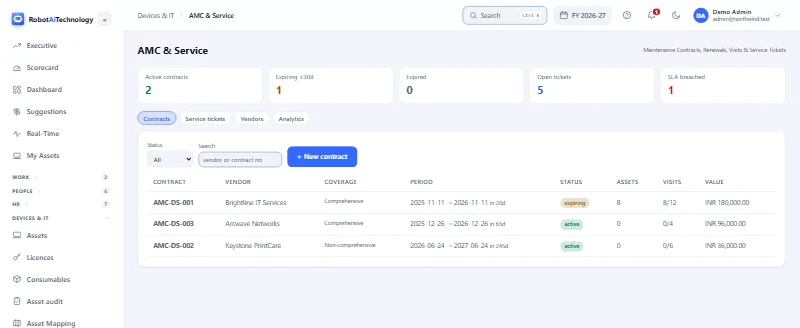
Maintenance contracts with their coverage, SLAs, preventive visits, vendors and renewals.

  • Free
  • Starter
  • Growth
  • Enterprise
  • Contracts with their coverageCreate a contract with its coverage, SLA and term, attach the equipment it covers, and link the vendor who provides the maintenance.
  • Renewals before the end dateExpiring contracts are flagged in the renewals view, reminders go out before cover lapses, and Renew extends the term.
  • Preventive maintenance on scheduleDefine maintenance schedules against equipment, and preventive-maintenance tickets are raised automatically when they are due.
  • Visits used, per contractPreventive visits used against each contract, next to its period and days left, so you get the service you pay for.
  • Service tickets with SLA clocksRaise a ticket against covered equipment; its SLA clock tracks response and resolution, and breaches surface before they slip.
  • Vendors, rated and in their own portalVendor scorecards, and a vendor portal where each vendor sees only its own contracts, assets and tickets.
  • Vendor bills, approvedVendor bills and payments are tracked with their own approval workflow, alongside the contracts they belong to.
  • Cover your people can seeEmployees see the warranty and AMC cover of their own equipment under My Assets.
  • Renewals on the dashboardAMC contracts, warranties and licences that run out in the next 30 days, on the operations dashboard.

How AMC management works

Helpdesk & ticketing

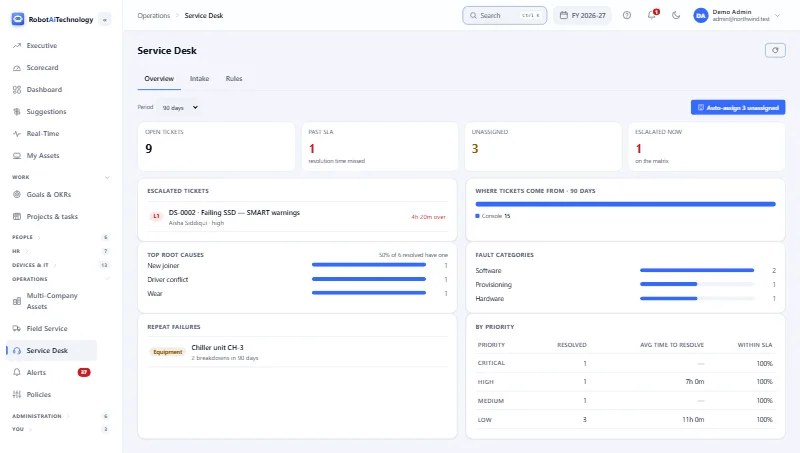
A service desk with SLA clocks, auto-assign, an escalation matrix and root causes.

  • Free
  • Starter
  • Growth
  • Enterprise
  • SLA clocks on every ticketResponse and resolution targets on every ticket, with what is past due and what is escalated in plain view.
  • Auto-assign by your rulesUnassigned tickets go to the right people automatically, by the rules you set, or you assign them by hand.
  • An escalation matrixDecide who hears about a late ticket and when: the assignee, their manager, dispatchers or administrators, level by level.
  • Tickets from email, WhatsApp or the APIBesides the console, tickets can arrive by email, by WhatsApp or through the tickets API, each matched to its sender and logged.
  • Root causes and repeat failuresClosures can require a root cause, and equipment that keeps breaking down is listed, so you fix the cause, not the symptom.
  • SLA performance at a glanceTickets past their resolution time, and the share closed on time over the last 30 days, on the operations dashboard.

How helpdesk & ticketing works

Field service

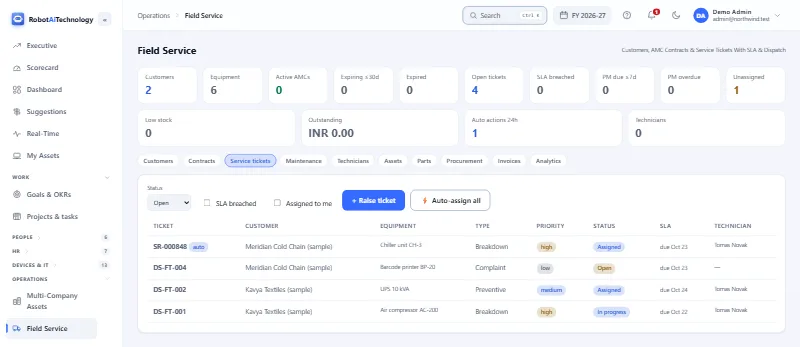
Service for your customers: their equipment, SLA tickets, dispatch, parts, a portal and invoices.

  • Free
  • Starter
  • Growth
  • Enterprise
  • Every customer kept apartEach customer's equipment is segregated, with per-customer access, so you can look after many fleets without mixing them.
  • Dispatch by ruleAuto-assign sends unassigned visits to available technicians, or you assign by hand; technicians update each job and log the work done.
  • Response and resolution SLAsEvery service ticket carries response and resolution targets, and breaches surface while there is still time to act.
  • Preventive maintenanceMaintenance schedules raise preventive visits automatically when they fall due, and overdue visits stand out.
  • A portal for your customersCustomers get scoped access to see their own equipment and raise requests; you issue and revoke it.
  • Critical faults raise a ticketWhen customer equipment is marked critical, a service ticket is raised for it automatically.
  • Parts and procurementParts and procurement tracked with the maintenance plans and technicians, for every customer.
  • Invoices from finished jobsA resolved billable job can draft its invoice, which then moves through submission, approval, payment and overdue chasing.
  • Technicians and vendorsTechnicians and vendors managed in one place, with a technician role for the people who do the work.

How field service works

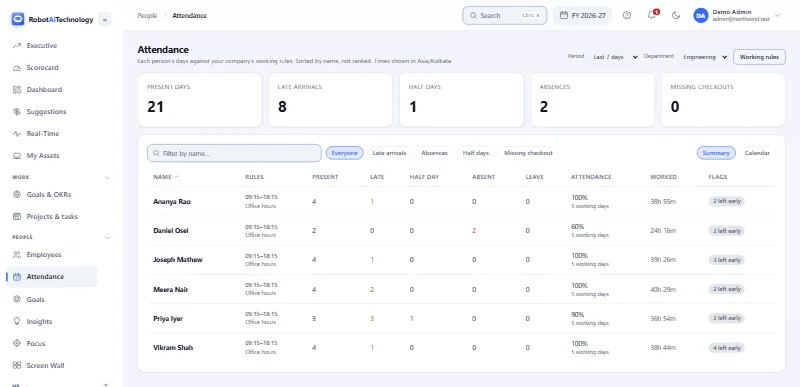
Attendance & workforce

Attendance from real sign-in activity, measured against your own working rules.

  • Free
  • Growth
  • Enterprise
  • Day statuses from real sessionsPresent, half-day, absent, holiday and more, worked out from agent sessions and your attendance policy, with leave included.
  • Your rules, per branch or departmentShift hours, grace periods, half-day minimums, work days and holidays, set for the company, a branch or a department.
  • Exceptions in one clickLate arrivals, early leaves, absences, half days and missing check-outs, each a filter away.
  • Time, not contentAttendance and idle detection count time, never content, and are the only collection on by default.
  • A daily performance reportEach person's day as working, idle, unused, video and social time, measured against their own history, not against colleagues.
  • Everyone sees their own recordEach person sees their own attendance and activity under My Activity, in the same detail their manager sees.
  • Managers see their own peopleWith reporting lines, a manager's view can be limited to the people who report to them, directly or down the chain.
  • Reports by emailSchedule a report to arrive by email; every run re-checks what its creator is allowed to see.
  • Sorted by name, never rankedAttendance lists are sorted by name. The product does not rank people against each other.

How attendance & workforce works

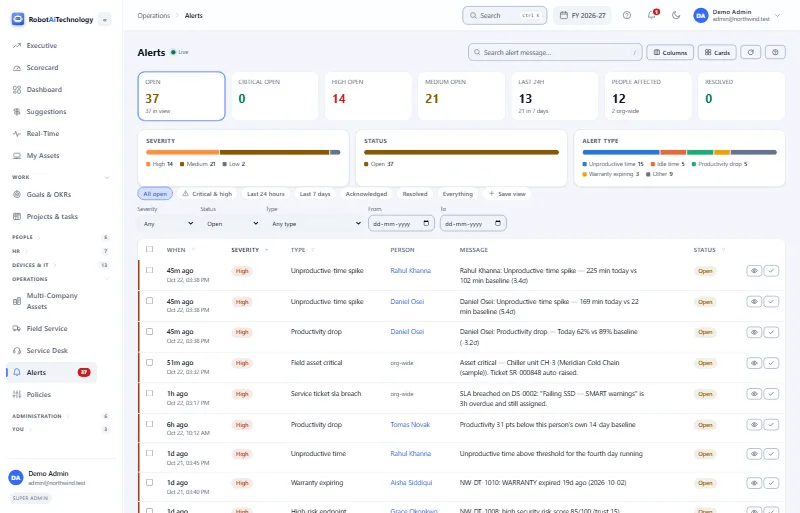
Monitoring & alerts

Device health, online status and alerts, with activity capture that is consent-first.

  • Free
  • Starter
  • Growth
  • Enterprise
  • Device health, fleet-wideDisk, performance and reporting status for every device, rolled up daily, with disk-space and offline alerts and a daily digest by email.
  • Alerts you can act onRule-based alerts by severity and type (device offline, SLA breach, warranty and more), filtered in a click and resolved in one.
  • Consent, enforced by the serverNo captured content is accepted until the person has acknowledged the current monitoring notice; change its wording and they are asked again.
  • Live view and the Screen WallLive screen view, per monitor, and a Screen Wall of live thumbnails for a second screen, once enabled in the policy and consented to.
  • Screenshots and recordings, off by defaultSwitch them on for a company, department, team or person. Nothing is captured before then, and you set how long it is kept.
  • Only in working hoursSet a capture window and blackout periods; outside them the agent captures no content.
  • Visible, never hiddenA tray icon and a monitoring notice on every PC, and every person can see their own recorded data.
  • An agent that looks after itselfCentral updates with a verified swap and rollback, a watchdog, and re-enrolment on its own if its credentials are lost.

How monitoring & alerts works

HR & payroll

Leave, India payroll with PF, ESI, PT and TDS, payslips, recruitment, reviews, the HR desk and exits.

  • Free
  • Starter
  • Growth
  • Enterprise
  • Payroll with PF, ESI, PT and TDSSalaries from annual CTC, then the month: loss of pay from unpaid leave, joiners and leavers paid for their days, PF, ESI, professional tax and projected TDS (India).
  • Approved runs publish payslipsA second person approves each run (on by default). Approval publishes the payslips, which employees open and download as PDFs in My HR.
  • Bank and statutory filesThe register and PF, ESI, professional tax and TDS summaries, and a bank transfer file from an approved run, as CSV once exports are on for your company.
  • Leave, balances and approvalsLeave types with quotas, accrual and carry-forward. Requests go to the reporting manager; approved leave shows in attendance, and unpaid leave becomes loss of pay.
  • My HR for every employeeEach person's own page: their HR record, leave, payslips, documents, trainings, HR requests and resignation. Bank and job details stay with HR.
  • An HR desk that keeps secretsQueries, letter requests and complaints as numbered tickets with due times. Grievance and harassment tickets are seen only by the raiser, the assignee and company HR.
  • Jobs, candidates and offersOpenings and candidates from applied to hired, interview panels that rate 1 to 5, and numbered offer-letter PDFs you can email. Candidates are added by HR.
  • Review cycles and goalsA self-review, the manager's assessment and HR's final rating with any increment or promotion, plus goal check-ins and feedback from colleagues.
  • Exits with clearanceResignations get a clearance checklist for IT, Finance, the manager and HR, an exit interview, and a full and final settlement a second person approves.
  • Daily HR remindersBirthdays, anniversaries, probation ends, expiring documents, leave waiting for approval, overdue HR tickets and payroll before pay day. Each can be switched off.

How HR & payroll works

Security & identity

Single sign-on, SCIM, roles and scopes, two-step sign-in, sign-in rules, approvals, the audit log and access reviews.

  • Single sign-on with OIDC or SAMLConnections people reach by their email domain. A first sign-in can create the account with a default role, within your seats. Password sign-in stays available.
  • SCIM directory provisioningYour identity provider creates, updates and switches off accounts through a SCIM 2.0 endpoint and a company token. Removing someone frees their seat.
  • Roles, company roles and scopesBuilt-in roles or company roles with the permissions you pick, plus per-person grants. Each sees only its scope: company, department, branch, team or reporting line.
  • Two-step sign-in you can requireRequire an authenticator-app code for administrators or for everyone. Each person gets ten one-time recovery codes, and an administrator can reset a lost phone.
  • Network and sign-in hour rulesKeep the console to listed IP addresses, to chosen days and hours, or each branch to its office networks. Hours are checked on every request.
  • Password rules and session limitsStricter password length, expiry, reuse and lockout rules, idle sign-out, devices per person and how long a sign-in lasts. People can end their own sessions.
  • Approval for new sign-in devicesRecord the browsers people sign in from, flag new ones, or hold a new device until an administrator approves it. Blocking a device signs it out at once.
  • A second admin for sensitive accessWith approvals on, a change that adds sensitive access waits for another administrator and runs as them. You choose what counts as sensitive; removals never wait.
  • A searchable audit logSign-ins, refused sign-ins and changes to roles, settings and SSO, with who, when and from which address. Filter by action, person and date.
  • Access reviews on a scheduleReview everyone, administrators or people with sensitive access. Their manager keeps or removes each person's access with a note, and nothing goes without a decision.

How security & identity works

Remote operations

Diagnostics and approved fixes on your Windows PCs, hash-checked installs, and self-healing from your own alerts.

  • Free
  • Enterprise
  • Diagnostics without a site visitA system snapshot, running services, top processes, a ping and DNS test, pending updates or a fresh inventory, from several PCs at once. Read-only checks need no approval.
  • Approvals matched to the riskFlushing DNS or restarting a service waits for one approval. Reboots, shutdowns and software installs need a second administrator, and whoever asked can't approve.
  • Maintenance windowsSet a daily window and reboots, shutdowns and software installs can be approved only inside it. With no window set they are not time-restricted.
  • Software installs, hash-checkedRegister an installer with its SHA-256 hash; each PC downloads it and refuses to install unless the hash matches. Installs and rollbacks need a second admin.
  • Self-healing from your alertsLink an alert type to one safe command and the PC the alert is about gets it. Only read-only or reversible commands qualify; reboots and installs never run on their own.
  • Dry run first, with limitsNew rules start in dry run and only log what they would have done. Live rules are limited per PC, 3 runs an hour and a 30-minute cooldown by default.
  • See which fixes workedEach rule counts the fixes that succeeded, failed, expired or were skipped. If a fix fails, or the alert is still open 30 minutes later, the right people are told.
  • Results and a job historyEvery PC's exit code and output, kept with the job. Search the history by command, status, risk or time; jobs no PC answered close as expired, with the reason.
  • Recorded in the audit logRequests, approvals, refusals, automatic runs, results and changes to rules and the software list are written to your company's audit log.
  • Signed jobs from a fixed listEach job is signed for one PC and carries a deadline. The agent runs only commands from its built-in list and refuses a bad signature or a passed deadline.

How remote operations works

Endpoint health

A daily health score per PC, warnings before a disk fills, overload alerts and each PC's security posture.

  • Free
  • Starter
  • Growth
  • Enterprise
  • A daily health score per PCEvery PC gets a score from 0 to 100 and a status (healthy, warning, critical or offline) each day, kept as history with fleet health and storage trends.
  • Disk alerts before it fillsAn alert when a disk passes your threshold (85% by default), and another when its recent growth, on a straight line, would fill it within 14 days.
  • CPU or memory busy too longAn alert when a PC's CPU or memory averages 90% or more for 10 minutes, both changeable. It is resolved automatically when the average falls back.
  • Antivirus, firewall and encryptionEach PC shows the antivirus products Windows reports, its active firewall profiles and BitLocker, with a trust score from 0 to 100 that drops for each one off.
  • A daily health emailCompany administrators get a daily email with the fleet's status mix, average health score, disk-threshold breaches and the PCs that need attention.

How endpoint health works

Plans

Which plan includes what

Straight from the live plan catalogue, the same rules the product enforces.

Each module and the plans that include it
ModuleFreeStarterGrowthEnterprise
IT asset management
IT asset inventoryIncludedIncludedIncludedIncluded
Asset health & diagnosticsIncludedIncludedIncludedIncluded
AMC management
AMC contracts & renewalsIncludedIncludedIncludedIncluded
Service tickets & SLAIncludedIncludedIncludedIncluded
Helpdesk & ticketing
Alerts & automation rulesIncludedIncludedIncludedIncluded
Field service
Field service & customer portalIncludedNot includedNot includedIncluded
Attendance & workforce
Attendance & shift trackingIncludedNot includedIncludedIncluded
Productivity & activity trackingIncludedNot includedNot includedIncluded
Scheduled report deliveryNot includedNot includedIncludedIncluded
Monitoring & alerts
Live screen viewNot includedNot includedNot includedIncluded
Session recordingsNot includedNot includedNot includedIncluded
HR & payroll
PayrollIncludedNot includedIncludedIncluded
RecruitmentIncludedNot includedIncludedIncluded
Goals & targetsIncludedIncludedIncludedIncluded
Remote operations
Remote operationsIncludedNot includedNot includedIncluded
Self-healing automationIncludedNot includedNot includedIncluded
Also included
Excel & PDF exportsNot includedNot includedNot includedNot included
Insights & anomaly detectionIncludedNot includedIncludedIncluded
Content & public siteNot includedNot includedNot includedNot included
API & integrationsNot includedNot includedNot includedNot included

Compare plans and prices

See it on your own devices

Start a free trial and enrol your first PC in minutes, or book a demo and we will walk you through it.

Book a demo Free trial